
9.5 KiB
CommandBot
1.1.3
Discord.js framework that helps you build your own Discord bot.
Key features
- command system
- auto-generated help command
- command permissions
Table of contents
Getting started
Installation
- Install this package using npm
npm install commandbot@latest
- Add the following entry to your package.json file
"type": "module"
- Import the package
import { Bot, Command } from 'commandbot';
Creating bot instance
const bot = new Bot({
    name: "Command bot", // Name of your bot
    prefix: "!", // Prefix used to call commands
    argumentSeparator: ",", // Used to get arguments from message
    helpCommand: true, // Enable or disable the *help* command (optional)
    clientOptions: undefined, // Instance of ClientOptions from Discord.js
    token: "" // Bot token from Discord Developer Portal (optional, you can pass the token in *start* method)
});
Start your bot using
bot.start();
Optional arguments for this method
- port - number - if specified, the app will create a http server that will be listening on the specified port
- token - string - app token from Discord Developer Portal
Bot instance
The main object of this library has the following properties
- name - string - bot's name specified in the constructor
- client - Client - Discord.js client instance
- commands - CommandManager - base of the command system (see Commands)
- config - object - object that stores the login token and helpMessage value from the constructor
- messages - SystemMessageManager - object instance containing all configuration parameters for built-in messages (see Customization and built-in messages)
- on - object - object containing function that trigger on specified events (see Events)
Commands
[IMPORTANT] All commands have to be declared above the start method
All parameters
- name - string - command name (used to trigger the command)
- function - Function - function that will trigger when the commands gets called
- visible - boolean - show command in the help message (optional, defaults to true)
- description - string - command description shown in the help message (optional)
- usage - string - command usage description shown in the help message (optional)
- permissionCheck - "ALL" | "ANY" - specifies if the caller has to have all of the specified permissions or any of that (optional, default value: "ANY")
- permissions - PermissionResolvable - permissions needed to run the command (optional)
- aliases - string | string[] - other words that can trigger the command with prefix (optional)
- keywords - string | string[] - other words that can trigger the command without prefix (optional)
Command function
Arguments
- m - Message - a message object instance containing message content, author and additional informations
- a - string[] - list of arguments passed with the message (splitted with argumentSeparator)
Return
If command function returns
- string - the returned text will be sent as a reply to the command caller
- MessageEmbed - the embedded content will be sent as a standalone message
Errors
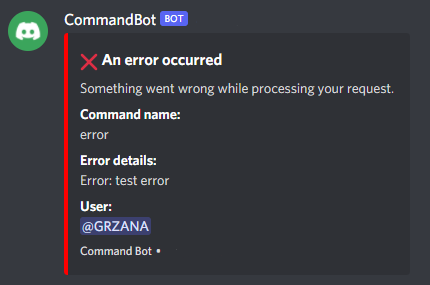
If your command throws an error, it will get logged to the console and sent to the user in a message with embedded content. The bot will not crash. (Example)
Command examples
Simple reply
- Create a command
//CREATE COMMAND
const command = new Command({
    name: "ping",
    function: (m, a) => {
        return 'pong';
    }
});
//APPEND IT TO THE COMMANDS LIST
bot.commands.add(command);
or
bot.commands.add(new Command({
    name: "ping",
    function: (m, a) => {
        return 'pong';
    }
}));
- Call it from Discord text channel (example prefix: "!")
!ping

Result:
@mention, pong
Example with arguments
- Create a command
const command = new Command({
    name: "repeat",
    function: async (m, a) => {
        if(a[0] && a[1]) {
            const count = parseInt(a[1]);
            if(!isNaN(count)) {
                for(let i = 0; i < count; i++) {
                    await m.channel.send(a[0]);
                }
                return `Repeated "${a[0]}" ${count} times`;
            }
            else {
                throw new Error('Number of messages is incorrect');
            }
        }
    }
});
bot.commands.add(command);
or
bot.commands.add(new Command({
    name: "repeat",
    function: async (m, a) => {
        if(a[0] && a[1]) {
            const count = parseInt(a[1]);
            if(!isNaN(count)) {
                for(let i = 0; i < count; i++) {
                    await m.channel.send(a[0]);
                }
                return `Repeated "${a[0]}" ${count} times`;
            }
            else {
                throw new Error('Number of messages is incorrect');
            }
        }
    }
}));
- Call it from Discord text channel (example prefix: "!", example separator: "," [default])
!repeat test, 5

Result:
test
test
test
test
test
@caller, Repeated "test" 5 times
Events
There are 2 events defined in the on property
- message - Function - a function that will trigger for every message sent in any text channel (a Message object is passed to the first argument)
- command - Function - a function that will trigger for every message that gets recognized as a command (a Message object is passed to the first argument and a CommandMessageStructure object to the second argument)
[IMPORTANT] Do not use client.on('message') event handler! This handler is a core part of the command system.
Customization and built-in messages
All configuration parameters for messages are stored in messages property (example: bot.messages)
Help message
Configuration parameters are stored in messages.help property
- title - string - title of help message
- bottomText - string - text shown below the title
- color - ColorResolvable - color of the embedded content
- description - string - command description (equivalent of the description property in Command object)
- usage - string - equivalent of the usage property in Command object (You can pass a command name, alias or keyword with the help command to get detailed information about the specified command)
System messages
All options are stored in messages.system property
There are 3 types of system messages
- Error message (ERROR)
- Command not found message (NOT_FOUND)
- Insufficient permissions message (PERMISSION)
Each message can be customized using these properties
- title - string - title of the message
- bottomText - string - text shown below the title
- accentColor - ColorResolvable - color of the embedded content
- showTimestamp - boolean - show time and date at the bottom of the embedded content
- footer - string - footer of the embedded content
The messages.system also contains a deleteTimeout property. It specifies the time (in ms) after which a system message will be deleted. Set it to Infinity to never delete messages (default value).
Complete example
import { Bot, Command } from 'commandbot';

const bot = new Bot({
    name: "CommandBot",
    prefix: "!"
});

bot.messages.help.accentColor = '#ff0000';
bot.messages.system.NOT_FOUND.accentColor = "BLUE";

//Command triggers: !ping, !pong, pingpong
bot.commands.add(new Command({
    name: 'ping',
    aliases: 'pong',
    keywords: 'pingpong',
    function: (m, a) => {
        return 'Bot ping: ' + bot.client.ws.ping + 'ms';
    }
}));
bot.commands.add(new Command({
    name: "repeat",
    function: async (m, a) => {
        if(a[0] && a[1]) {
            const count = parseInt(a[1]);
            if(!isNaN(count)) {
                for(let i = 0; i < count; i++) {
                    await m.channel.send(a[0]);
                }
                return `Repeated "${a[0]}" ${count} times`;
            }
            else {
                throw new Error('Number of messages is incorrect');
            }
        }
    }
}));

bot.start(3000, 'TOKEN');